The GoHighLevel setup checklist below covers the scoping side. For the build itself, stage by stage, read our step-by-step GoHighLevel CRM setup guide for home services. The client in this example does AC servicing and duct cleaning first, plus maintenance, cleaning and annual maintenance contracts. A GoHighLevel sub-account already ran the US side. The UAE side ran on Zoho CRM and a separate phone system, and they wanted one system for both.
Why get admin access before you quote a GoHighLevel build?
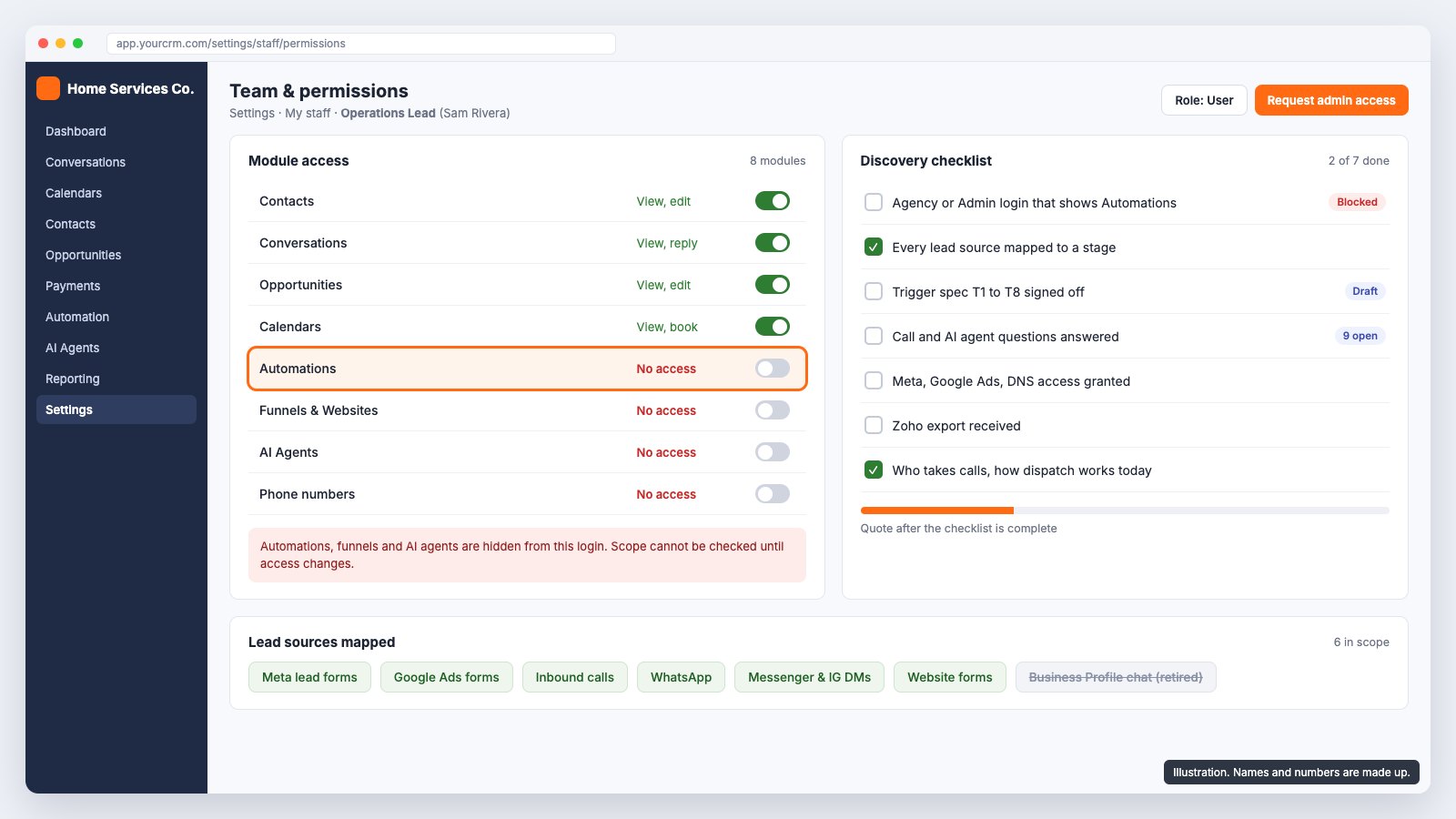
On our first call, the client shared their screen and logged in. The login did not have admin rights. Automations, Funnels and AI Studio were hidden, so we could not see what workflows already existed, what was half built or what would clash with new work.
A quote made from that view is a guess. Now we ask for Agency or Admin access first, and we check that the Automations section actually shows before we scope anything. If the client cannot grant it on the call, we book a second call rather than quote blind.
Which lead sources should the GoHighLevel setup connect?
List every source before you design a single stage. This client told us they get 20 to 25 leads a day in Dubai on a bad day, with 8 to 10 ad campaigns live at once across Meta and Google. Each source needs a path into the pipeline. Ours looked like this:
- Meta lead forms from Facebook and Instagram.
- Google Ads lead forms.
- Inbound calls: Google Local Services Ads in the US, call extensions on Google Ads, and tracked numbers.
- WhatsApp Business, plus Facebook Messenger and Instagram DMs.
- Website forms.
One source clients often ask for cannot be connected. Google Business Profile chat no longer exists: Google shut it down in July 2024. Calls from the listing still reach the number, so those arrive as calls. Also agree how source detail is recorded. "Google" is not enough; something like Google, AC repair, Dubai, campaign name tells the owner which spend works.
What goes in a GoHighLevel pipeline trigger spec?
A trigger spec is a short table: what event happens, which stage the card moves to, and whether that happens automatically or by a rep. We write it before building anything and get the client to approve it. The pipeline here had seven stages: Opt-in, Hot Leads, Booked Appointment, Completed, Cancelled Appointment, Manual Follow-up and Recycled Leads.
| ID | Trigger | Card moves | Auto or manual |
|---|---|---|---|
| T1 | New Meta or Google Ads form submission | New contact and card in Opt-in | Auto |
| T2 | Lead replies, or a call connects | Opt-in to Hot Leads | Auto |
| T3 | Rep books an appointment on the card | Hot Leads to Booked Appointment | Auto |
| T4 | Appointment time passes, not cancelled or rescheduled | Booked to Completed | Auto |
| T5 | Appointment cancelled | Booked to Cancelled Appointment | Auto |
| T6 | Cancelled appointment rescheduled | Cancelled to Hot Leads | Auto |
| T7 | Rep decides a lead needs chasing (no response, not closed, not rescheduled) | To Manual Follow-up; back to Hot Leads if recovered | Manual |
| T8 | Five follow-up touches without recovery | Manual Follow-up to Recycled Leads | Auto, needs a touch count field |
Writing it down exposes decisions early. T4 moves a card to Completed by time alone, so reps must move it back if the job did not happen. T8 only works if a number field counts touches. Recycled Leads feed later reactivation campaigns, so the client has to agree what goes there. Each of these is a question for the client, not for the builder at midnight.
What should you ask about GoHighLevel calls and the AI voice agent?
Calls were the hardest part of this scope. The plan: ring every logged-in sales user at once (GoHighLevel allows up to seven on one number), and if nobody answers in about ten seconds, the shortest ring time it allows before a fallback, an AI voice agent picks up. It asks the number of bedrooms and units, when the ducts were last cleaned, the address, a name and a callback number. It then creates the card in Opt-in with those answers as fields, alerts the team and sets a callback task.
The client also had a problem with their old phone system: while one rep was on a call, the others saw it as missed until it ended. The requirement was to show who answered and stop ringing everyone else. A missed call gets an automatic text in the US or a WhatsApp in the UAE, plus a callback task with a five-minute target. These are the questions we left open for the client to answer:
- 01Ring all reps at once, or round robin?
- 02Can the ring timeout change after hours?
- 03Does the AI agent answer out of hours too?
- 04Do Local Services Ads calls forward to the GoHighLevel number?
- 05Are recordings and transcripts saved to the card, and what consent message plays?
- 06Does an AI-handled call match an existing contact by phone, or create a new card?
- 07Does an AI-qualified call stay in Opt-in or go straight to Hot Leads?
- 08What is the callback target, and how are reps told?
- 09Who pays the AI minutes, telephony and inbox costs, which are billed on usage on top of the build?
What access do you need for GoHighLevel client onboarding?
Ask for all of it in one message, on day one. Missing access is the most common reason a timeline slips, and it is the easiest one to prevent.
- GoHighLevel Agency or Admin access, with Automations visible.
- A Zoho export, or admin access to the old CRM.
- Admin on Meta Business Manager.
- Access to Google Ads.
- The WhatsApp number and the phone it currently sits on.
- DNS access for the sending email domain.
- A list of the reps who take calls.
- A plain description of how dispatch works today.
Check the channel rules too. US texting needs A2P 10DLC brand and campaign registration before SMS works reliably. In the UAE, business SMS needs a registered sender name, so WhatsApp was the main channel there.
How do you plan a Zoho to GoHighLevel migration?
Treat the migration as its own line in the checklist, not as part of setup. Here the UAE side ran on Zoho CRM, so its contacts and open deals had to land in the same GoHighLevel pipeline as the US leads. We asked for a Zoho export, or admin access to export it ourselves, on day one.
- Clean before you import. Remove duplicates and put phone numbers in one format, or calls and WhatsApp messages will not match the right contact.
- Map every field from Zoho to a GoHighLevel field, and create custom fields for anything without a home.
- Decide where old deals land in the new seven-stage pipeline, so a lead from last month does not restart in Opt-in.
- Import a test batch first, check it with the client, then run the full import.
In the plan this sat in week two, after users, pipeline and fields were built, so the data had somewhere to go.
How many hours does a GoHighLevel build like this take?
We scoped this build at 43 to 48 hours of work, delivered over four to five weeks from the day access is complete. Pipeline automations take the biggest share, which is one more reason to fix the trigger spec first.
| Area | Hours |
|---|---|
| Discovery | 2 |
| CRM setup (users, pipeline, fields, calendar) | 2 |
| Zoho migration | 3 to 4 |
| Lead capture (Meta, Google, WhatsApp, Messenger, Instagram) | 4 |
| Pipeline automations | 9 to 10 |
| Phone system | 3 |
| AI voice agent | 6 to 7 |
| Unified inbox | 2 |
| Job dispatch | 5 to 6 |
| Reporting | 1 |
| Testing | 4 to 5 |
| Training | 2 |
| Total | 43 to 48 |
Job dispatch was in scope because the client asked whether technicians could be managed in GoHighLevel. They can, as a custom object for jobs or as a second pipeline with its own fields.
What delays GoHighLevel projects?
Rarely the build itself. On projects like this, time goes on things outside the builder's hands, so name them in the proposal:
- Phone number approval.
- Meta and WhatsApp business verification.
- AI voice tuning through real test calls, including callers with different accents.
- Dirty CRM data: duplicates and phone numbers in mixed formats in the export.
- Missing access or slow review on the client's side.
How should phases and sign-off work?
We split the work into four phases: discovery and setup, build, testing, then launch and training. The client approves each phase before the next starts. In week one that means users, pipeline, fields, calendar, the phone number request and the WhatsApp connection started. Week two is the Zoho clean-up and import plus the Meta, Google and messaging connections. Week three is stage automations, the five-touch sequence, the inbox and the email domain. Week four is ring-all, the AI voice agent with test calls, dispatch and the dashboard. Week five is end-to-end testing, AI tuning, go-live and training.
Sign-off at each phase is the last item on our GoHighLevel setup checklist, and it protects both sides. The client sees progress, and you never find out in week five that a stage meant something else to them. A build at this scope is quoted as a fixed fee after discovery, not before it.
If you build GoHighLevel accounts for clients and want a team behind you, our page on GoHighLevel work for Pakistani agencies explains how we support agencies white-label. For how the trigger spec turns into a live pipeline, the complete GoHighLevel home services setup walks through each stage. Ready to scope a build? [Get a custom quote](/contact/) or book a free discovery call.
Sources
- The checklist, the trigger spec, the open questions, the access list, the hours by area, the week plan and the list of delays come from GoDesign's own discovery and proposal for a home services company in late October 2026. The client is not named, and the hours describe that scope, not a fixed rate for every build.
- Lead volumes and campaign counts are what the client told us on the discovery call. They were not measured by us.
- GoHighLevel behaviour described here (up to seven users ringing at once on one number, a ring time of about ten seconds as the shortest before a fallback, custom objects) was noted during that discovery. GoHighLevel changes its features and limits, so check the current documentation before you quote. Google ended Google Business Profile chat in July 2024; calls from a listing still reach the business number.
- Running costs such as phone numbers, call minutes, AI voice minutes, WhatsApp conversations and email are billed by the platforms on usage and are not part of any GoDesign fee.
- GoDesign is an independent agency. It is not a GoHighLevel employee, partner or affiliate, and the product name is used only to refer to that platform.
- The cover image is an illustration. The company, names and screen are made up.
Common questions
- What should a GoHighLevel setup checklist include?
- Admin access with Automations visible, a list of every lead source, a trigger spec for each pipeline stage, answers on call handling and any AI voice agent, an access list (Meta, Google Ads, DNS, WhatsApp, the old CRM), and agreed phases with client sign-off.
- Why do you need GoHighLevel admin access before quoting?
- Without admin rights, sections such as Automations, Funnels and AI Studio can be hidden. You cannot see what already exists or what will clash with new work, so any quote is a guess.
- How long does a GoHighLevel setup take?
- The build in this example, with lead capture, pipeline automations, phone, an AI voice agent, a Zoho migration and job dispatch, was scoped at 43 to 48 hours over four to five weeks from complete access. Smaller scopes take less.
- Can you migrate contacts from Zoho CRM to GoHighLevel?
- Yes. We take a Zoho export or admin access, clean out duplicates and mixed phone formats, map the fields to GoHighLevel and check a test batch before the full import. In this example the Zoho migration was scoped at 3 to 4 hours.
- Are GoHighLevel running costs included in the setup fee?
- No. Phone numbers, call minutes, AI voice minutes, WhatsApp conversations and email are billed by the platforms on usage, on top of the build.
- Are you a GoHighLevel partner?
- No. GoDesign is an independent agency based in Islamabad and is not affiliated with GoHighLevel. We scope and build on the platform for clients and agencies.